AskMuse + Microsoft Teams
Muse answers the call. A card lands in your Teams channel: who called, how it went, what they wanted, and a button to open the call.
Connects on the Starter plan and up, free trial included.
 Sam Lee(555) 010-0188
Booked an appointment
- Who
- Sam Lee · (555) 010-0188
- When
- Wed, Nov 18, 9:08 a.m.
Service call: heat pump blowing warm air
Marlow Heating & Cooling
Open the callIllustration with placeholder details. Not a Microsoft Teams screenshot.
Four steps, none by hand
- 01
Muse answers
24/7, in your business's name. Gets who and what, books a time if you let it.
- 02
The call ends
One card in your channel: how it went, who, when, what they wanted.
- 03
Bookings post too
A booking made, moved or cancelled, on a call or online, gets its own card.
- 04
And new leads
Website chat leads and anyone who asks for a person. The button opens the call.
One card per thing that happens
The same words as the Slack message, as a Teams card with an Open the call button.
What gets posted
| A finished call | How it went (for example “Booked an appointment” or “New lead: left their details”), who, when, what they wanted, and Open the call |
|---|---|
| A booking made, moved or cancelled | “New booking”, “Booking moved” or “Booking cancelled”, who and when. A move shows the old time too. |
| A new lead | “New lead:” and where it came from (website chat, for example), who and what they wanted |
| Someone asked for a person | “Someone asked for a person:”, who, and why |
| The test | “AskMuse is connected to this channel.” |
What it doesn't do
- Old Office 365 connector links (webhook.office.com) don't work. Microsoft retired them in May 2026; use a Workflows link.
- It only posts. Replies in Teams don't reach the caller.
- A caller's words can't mention anyone or hide a link in the card.
- For clinics and law firms, cards say who called and when, not what they said.
Your calls, transcripts and leads are stored in Canada. Microsoft keeps what it receives under its own terms.
Listen to a heating and cooling call
The same sample as on AskMuse for HVAC companies. Names in the recording differ from the example card on this page.
Good to know
- Times are in your business's time zone.
- Cards are in your business's language, English or French.
- Calls you've marked as family and friends stay private and aren't posted.
- A lead that came from a call is in that call's card, not posted twice.
Every call is also in your AskMuse dashboard, with the summary and transcript.
Set it up in 3 steps
You need to be able to add a workflow to the Teams channel.
Make a Workflows link in Teams
In the channel: ••• › Workflows › Send webhook alerts to a channel › Next › pick the team and channel › Add workflow. Copy the link it shows. Leave Who can trigger the flow on Anyone.
Send webhook alerts to a channelAdd workflow- Team
- Marlow
- Channel
- General
- Who can trigger
- Anyone
- Link
https://….environment.api.powerplatform.com/…Copy
Illustration of the step. Not a Microsoft Teams screenshot.
Paste it into AskMuse
Settings › Integrations › Microsoft Teams. Paste the link, press Save Teams link.
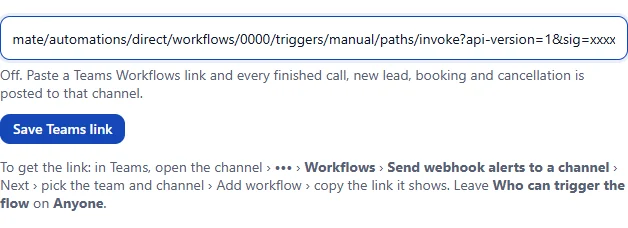
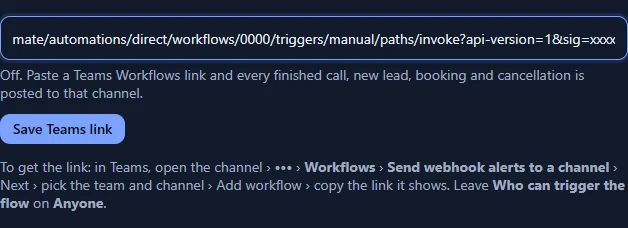 Once saved, the link stays hidden: anyone holding it can post to your channel.
Send a test message
Press Send a test message. “AskMuse is connected to this channel.” appears in Teams.
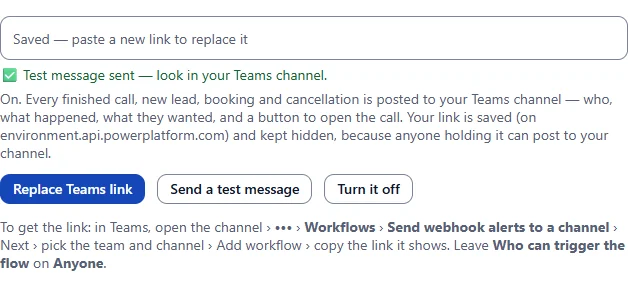
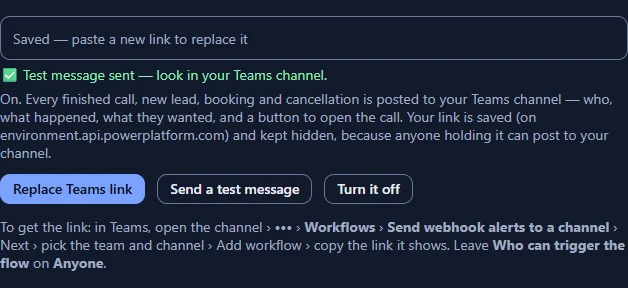 Real dashboard, placeholder link. Turn it off any time from the same row.
On Starter and up, and the 7-day free trial includes it. Use the trial to hear Muse answer your own calls with Teams connected, then keep it on any plan from Starter.
Compare the plansMicrosoft Teams + AskMuse FAQ
I have an old Teams Incoming Webhook link. Will it work?
No. Microsoft retired Office 365 connector links in May 2026, and they no longer deliver. Make a Workflows link with Send webhook alerts to a channel and paste that.
The test says Teams refused it. What now?
Open the workflow in Teams and set Who can trigger the flow to Anyone, or turn the workflow back on. If it was deleted, make a new one and paste its link.
Is Teams part of the free trial?
Yes. Microsoft Teams is on the Starter plan and up, and the 7-day free trial includes it.
Hear Muse before you connect anything
Talk to Muse in your browser or call the line. Setup takes about 3 minutes.
Microsoft Teams is a trademark of its owner. AskMuse, a Muse Nexus product, isn't affiliated with or endorsed by Microsoft; it posts through the Workflows link you create in your own channel.