Home › AI receptionist › Set it up

Every call answered. Every job booked.

Live in about 3 minutes.

Muse answers your phone day and night, books the job into your calendar, texts the caller a confirmation and writes up every call for you. Signing up takes about 3 minutes. Then you test it, and go live when you are ready.

7 days free, no card needed. The trial includes 50 calls and 100 chats. Your own test calls are free for the first 60 minutes.

What you get

The calls you lose today, answered

✓Calls answered, day and night

Muse picks up every call as your business, in English and French on every plan, and in Punjabi, Hindi and Spanish on Pro.

✓Jobs booked

Straight into your calendar: Google two-way, Apple and Outlook by feed link. The caller gets a text confirming the time.

✓Nothing missed

Every call lands on your dashboard and in the Android app with a summary. When you want a person on the line, Muse transfers the call.

Sign-up

Five steps, about 3 minutes

No card, no installs, nothing to buy.

  1. 1

    Pick your business type

    ~10 sec

    Choose yours from a list of 40.

  2. 2

    Give your website, or chat with Muse

    ~1 min

    Muse reads your site, or you tell Muse about your business in a short chat, so Muse learns your services, prices and hours.

  3. 3

    Name Muse and pick a voice

    ~30 sec

    Choose what Muse is called and how Muse sounds.

  4. 4

    Create your account

    ~30 sec

    Your email and a password. The 7-day trial starts with no card.

  5. 5

    Confirm your mobile

    ~20 sec

    We text a code to your phone. Type it in and you are done.

We timed the whole sign-up at about 2 and a half minutes. Each step is an estimate; yours depends on how fast you type.

After sign-up

Test call first. Then go live.

You hear Muse before a single customer does.

1

Make a test call

From your dashboard, press Test call and hear Muse answer as your business. Not quite right? You can edit Muse call flow and add your own questions on the dashboard, then call again.

2

Go live: forward your line

Keep the number on your van, your cards and your listing. You turn on call forwarding on your phone, for every call or only the ones you miss, and those calls ring through to Muse. Undo it any time, the same way.

or

Or get a number

Prefer a fresh line for your ads or your website? Take a number and Muse answers it.

New to call forwarding? It is one setting on your phone.

Call forwarding sends calls from your current line to another number, either always or only when you do not pick up. You turn it on by dialing a short code your carrier gives you (often *72 then the number, or *61 for missed calls only), and you turn it off the same way. Nothing to install and nothing to buy; your dashboard shows the steps when you are ready.

What you see after

Every call, written up for you

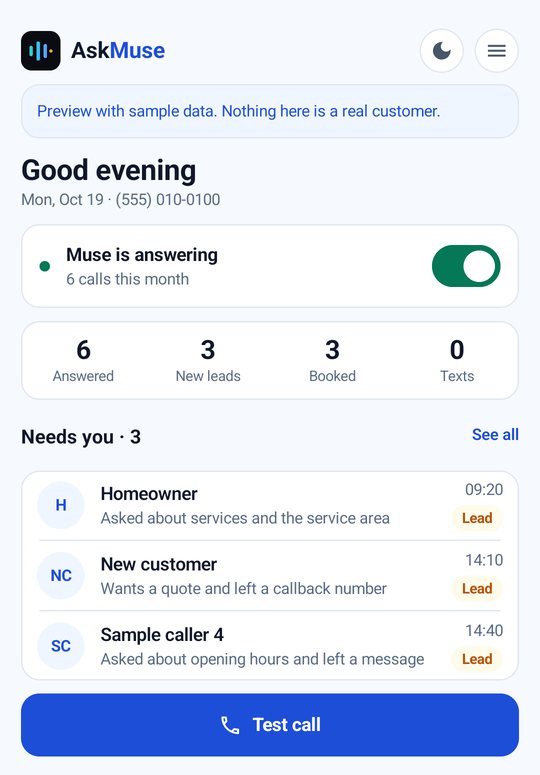
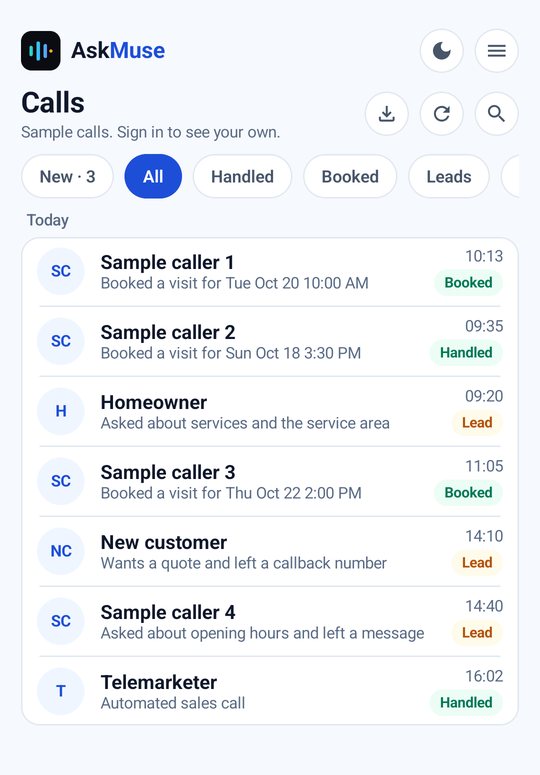
The AskMuse app, shown here with sample data. The web dashboard shows the same calls.

The AskMuse app home screen: Muse is answering, calls answered, new leads and bookings, and a Test call button
The AskMuse app calls list: each call with who rang, what they wanted and whether it was booked
A summary of every call, on the dashboard and in the Android app
Bookings in your calendar, and a confirmation text to the caller
New leads with a number to call back
Quick answers

Before you start

Do I need a card to start?

No. The 7-day trial needs no card and includes 50 calls and 100 chats. Your own test calls are free for the first 60 minutes. Pick a plan when the trial ends; nothing is charged until you do.

Do I have to change my phone number?

No. You forward your own line to Muse with a carrier code, or you take a new number from us. Forwarding is reversible any time.

What languages does Muse speak?

English and French on every plan. Punjabi, Hindi and Spanish on Pro.

Can I change what Muse asks callers?

Yes. Edit Muse call flow and add your own questions on the dashboard.

What if a caller asks something Muse does not know?

Muse says it does not have that, never makes up a price or a time, and takes a message. The question shows on that call in your dashboard so you can add the answer. If a caller asks for a person and live transfer is set up, Muse connects them only after they say yes.
Hear Muse first, then start.

Call the demo line, or start the trial. About 3 minutes either way.