AskMuse + Google Sheets
Muse answers the call. Each call, lead and booking is added as a row to a sheet in your own Google Drive.
Connects on the Starter plan and up, free trial included.
 Sam Lee(555) 010-0188
| A | B | C | D | E | … | |
|---|---|---|---|---|---|---|
| 1 | Date & time | Type | Caller name | Phone number | What they wanted | … |
| 2 | 2026-11-18 09:08 | Call | Sam Lee | (555) 010-0188 | Move-out clean, 2-bedroom apartment | … |
Illustration with placeholder details. Not a Google Sheets screenshot.
Four steps, none by hand
- 01
Muse answers
24/7, in your business's name. Gets who and what, books a time if you let it.
- 02
The call ends
One row: when, who, their number, what they wanted, how it went.
- 03
Bookings get rows
A booking made, moved or cancelled adds its own row with the time.
- 04
And new leads
Website chat leads and anyone who asks for a person, with where they came from.
Nine columns, one row each time
AskMuse makes a sheet called “AskMuse calls” with this header row, on a tab called AskMuse.
The columns
| Date & time | When it happened, in your time zone (2026-11-18 09:08) |
|---|---|
| Type | Call, Lead, Asked for a person, Booking made, Booking moved or Booking cancelled |
| Caller name | Their name, when they gave it |
| Phone number | Their number |
| What they wanted | In a sentence or two |
| Outcome | How the call went, for example Booked an appointment |
| Booked for | The booked time, when there is one |
| Summary | The call's length. For other rows: where a lead came from, the old time of a move, or the confirmation code. |
| Open the call | A link into your AskMuse dashboard |
What it doesn't do
- It can't see the rest of your Drive. Google lets AskMuse open only the sheet it makes for you.
- It only adds rows. It never edits or deletes the ones already there.
- Cells are written as plain text, so nothing a caller says can become a formula.
- For clinics and law firms, rows leave out what the caller said.
- Disconnecting stops new rows. The sheet stays in your Drive.
Your calls, transcripts and leads are stored in Canada. Google keeps what it receives under its own terms.
Listen to a cleaning call
The same sample as on AskMuse for cleaning companies. Names in the recording differ from the example row on this page.
Good to know
- The sheet is yours. Sort it, filter it, add your own columns to the right.
- Rename or delete the AskMuse tab and it's put back on the next row.
- If a row can't be written, the dashboard says so, and you can start a new sheet.
- A lead that came from a call is on that call's row, not added twice.
Every call is also in your AskMuse dashboard, with the summary and transcript.
Set it up in 3 steps
You need the Google account whose Drive should hold the sheet.
Press Connect
Settings › Integrations › Google Sheets › Connect.


Allow it in Google
Sign in with Google and press Allow. Google asks for one thing: the files you use with AskMuse, and nothing else in your Drive.
AskMuse wants access to your Google AccountAllowSee, edit, create and delete only the specific Google Drive files you use with this appIllustration of the step. Not a Google screenshot.
Send a test row
AskMuse makes “AskMuse calls” in your Drive. Press Send a test row, then Open my sheet to see it.
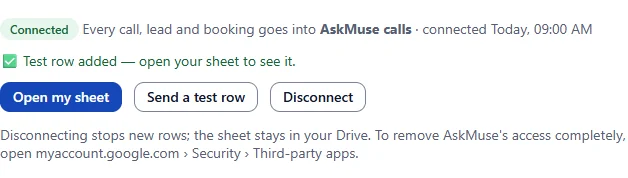
 Real dashboard, placeholder account. Delete the test row whenever you like.
On Starter and up, and the 7-day free trial includes it. Use the trial to hear Muse answer your own calls with Google Sheets connected, then keep it on any plan from Starter.
Compare the plansGoogle Sheets + AskMuse FAQ
Can AskMuse see my other Google Drive files?
No. Google gives AskMuse access only to the files it made or you opened with it, so it can open the sheet it makes for you and nothing else in your Drive.
What if I delete the sheet?
The next row can't be written, and the dashboard says so. Press Start a new sheet, or disconnect and connect again. Every call is still in AskMuse.
Does disconnecting delete my sheet?
No. It stops new rows; the sheet stays in your Drive. To remove AskMuse's access completely, open myaccount.google.com › Security › Third-party apps.
Hear Muse before you connect anything
Talk to Muse in your browser or call the line. Setup takes about 3 minutes.
Google Sheets and Google Drive are trademarks of their owner. AskMuse, a Muse Nexus product, isn't affiliated with or endorsed by Google; it connects with the access you allow from your own Google account.