AskMuse + Webhooks
Muse answers the call. Your server gets a signed JSON POST for every call, booking and new lead.
On the Starter plan and up, free trial included.
 Sam Lee(555) 010-0188
User-Agent: ALG-Receptionist-Webhook/1
X-ALG-Timestamp: 1795010960
X-ALG-Signature: sha256=3b1f…9c0e
{
  "event": "call.ended",
  "business": "Marlow Plumbing",
  "data": {
    "outcome": "booked",
    "summary": "Sam Lee · +1 555 010 0188 · tank leaking",
    "duration_s": 74,
    "booked_for": "2026-11-18T19:00:00Z",
    "urgent": true
  }
}
Illustration with placeholder details. The field names are the real ones.
Four steps, none by hand
- 01
Something happens
A call ends, a booking is made, moved or cancelled, or a new lead comes in.
- 02
One JSON POST
The same envelope every time: event, business, data.
- 03
Signed
With your own signing secret, so your server can check it came from AskMuse.
- 04
Your system takes over
Your own server, or Zapier, Make or n8n.
Six events, one envelope
Every event is {"event", "business", "data"}. Events sent from the website side (a booking moved or cancelled online, and both lead events) also carry "locale": en-CA or fr-CA. Field names never change with the language.
The events and their fields
call.ended | A call to your AskMuse number ended. outcome, summary, duration_s, booked_for, urgent; intake and caller_type when there are any. outcome is booked, lead, call, missed, transferred or spam. |
|---|---|
booking.created | Muse booked a caller in on a call. confirmation, starts_at, caller_name, callback_number, notes |
booking.moved | Moved from your dashboard or the customer's own link. confirmation, customer, was, when, starts_at, previous_starts_at |
booking.cancelled | On a call: confirmation, starts_at, caller_name. Online: confirmation, customer, when, starts_at |
lead.created | A new lead reached your Leads. lead_id, name, phone, email, wants, source, page, call_id, submitted_at, reason (empty) |
lead.escalated | Someone asked for a person. The same fields, with reason filled in. |
test_ping | The Test ping button. No data, not signed, sent from your browser. |
Lead events go out while a notification email is set in Settings. Setting one up in Zapier or Make? See the Zapier and Make guide or n8n.
What it doesn't do
- It doesn't retry. Each event is sent once, with a 5-second limit. If your endpoint is down, the call or booking is still in your dashboard.
- It doesn't follow redirects, and posts only to https:// on public addresses.
- Test ping isn't signed. It comes from your browser, not our server.
- For clinics and law firms, what the caller said (summary, notes, wants and the like) arrives as empty text. The field names stay, so your mapping keeps working.
Your calls, transcripts and leads are stored in Canada. The tool you send it to keeps what it receives under its own terms.
Listen to a plumbing call
The same sample as on AskMuse for plumbers. Names in the recording differ from the example on this page.
Check the signature
Each post carries X-ALG-Timestamp and X-ALG-Signature: sha256= the HMAC-SHA256 of the timestamp, a dot and the raw body, keyed with your signing secret. Compare, and refuse a timestamp more than 5 minutes old so a copied request can't be replayed.
The check needs the raw body exactly as it arrived; a step that rebuilds the JSON won't match.
Set it up in 4 steps
You need an https:// address that accepts a JSON POST.
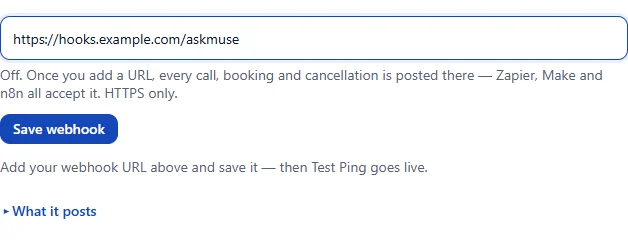
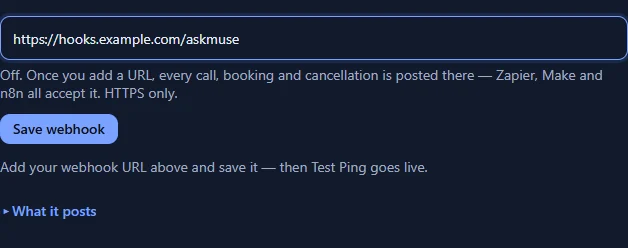
Paste your address
Settings › Integrations › Outgoing webhook. Paste your https:// address, press Save webhook.
Copy the secret and press Test ping
The row now shows your signing secret: keep it on your server. Test ping posts
{"event":"test_ping"}and shows what your server answered.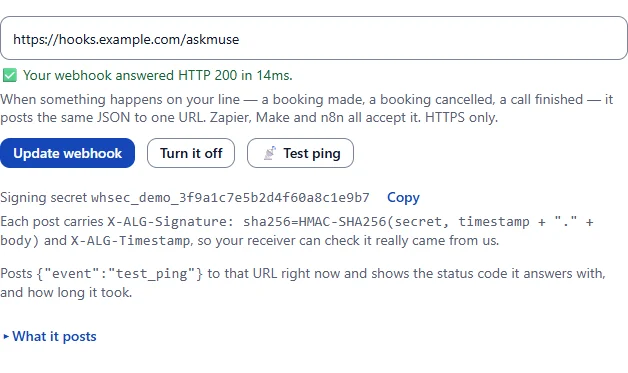
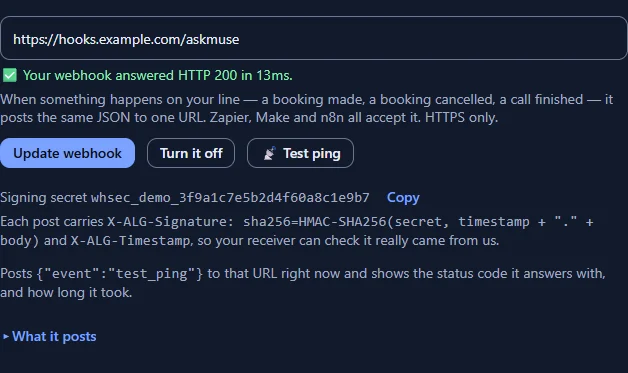 Real dashboard, placeholder address and secret.
Check the signature on your server
In Node:
const crypto = require("crypto");
function fromAskMuse(rawBody, headers, secret) {
  const ts = headers["x-alg-timestamp"];
  const sig = String(headers["x-alg-signature"] || "");
  if (!ts || Math.abs(Date.now() / 1000 - Number(ts)) > 300) return false;
  const want = "sha256=" + crypto.createHmac("sha256", secret)
    .update(ts + "." + rawBody).digest("hex");
  return sig.length === want.length &&
    crypto.timingSafeEqual(Buffer.from(sig), Buffer.from(want));
}
Send a real sample
Call your AskMuse number from your own phone, give your name and what you need, and hang up. A
Turn it off any time from the same row.call.endedevent arrives with every field filled in.
On Starter and up, and the 7-day free trial includes it. Use the trial to hear Muse answer your own calls with the webhook connected, then keep it on any plan from Starter.
Compare the plansWebhooks + AskMuse FAQ
Does AskMuse retry a failed delivery?
No. Each event is sent once, with a 5-second limit, and redirects aren't followed. If your endpoint is down, that event isn't sent again; the call or booking is still in your AskMuse dashboard.
How do I know a post really came from AskMuse?
Check X-ALG-Signature. It is sha256= the HMAC-SHA256 of X-ALG-Timestamp, a dot and the raw body, keyed with your signing secret. Refuse an old timestamp so a copied request can't be replayed.
Does it work with Zapier, Make and n8n?
Yes. Zapier's Catch Hook, Make's Custom webhook and n8n's Webhook node all take it. AskMuse isn't an app listed inside those tools; the webhook is how it connects.
Hear Muse before you connect anything
Talk to Muse in your browser or call the line. Setup takes about 3 minutes.
Zapier, Make and n8n are trademarks of their owners. AskMuse, a Muse Nexus product, isn't affiliated with or endorsed by them; the webhook posts to the address you give it.