AskMuse + n8n
Muse answers the call. Your n8n Webhook node receives every call, booking and new lead, and your workflow does the rest.
Works through the outgoing webhook, on the Starter plan and up, free trial included.
 Sam Lee(555) 010-0188
Illustration with placeholder details. Not an n8n screenshot.
Four steps, none by hand
- 01
Muse answers
24/7, in your business's name. Gets who and what, books a time if you let it.
- 02
AskMuse posts the event
A JSON POST to your Webhook node's URL, signed with your secret.
- 03
Your workflow branches
An If or Switch node on the event: a call, a booking, a lead.
- 04
n8n does the rest
Any node you like: a CRM, a sheet, a text, a ticket.
The events your workflow can use
In n8n the JSON arrives under body, so the event is {{ $json.body.event }}. Every field is listed on the webhook page.
Events
call.ended | A call ended: how it went, the summary, the length, the booked time, urgent |
|---|---|
booking.created | Muse booked a caller in on a call |
booking.moved | A booking was moved from your dashboard or the customer's link |
booking.cancelled | A booking was cancelled |
lead.created | A new lead reached your Leads |
lead.escalated | Someone asked for a person |
Using Zapier or Make instead? See the Zapier and Make guide.
What it doesn't do
- There's no AskMuse node in n8n. It connects through the Webhook node.
- It doesn't retry: one try, 5 seconds. Keep the workflow live so the Production URL answers.
- Test ping posts only
{"event":"test_ping"}, from your browser. For real fields, make a test call. - For clinics and law firms, what the caller said arrives as empty text.
Your calls, transcripts and leads are stored in Canada. n8n keeps what it receives under its own terms.
Listen to an electrical call
The same sample as on AskMuse for electricians. Names in the recording differ from the example on this page.
Workflows people build first
- Every
call.endedas a row in your own sheet layout - Booked and lead calls into your CRM, with a note
lead.escalatedas a text or a chat message to whoever is on call
Want the signature check? Each post is signed; the webhook page shows how.
Set it up in 4 steps
You need an n8n workflow that can be reached over https.
Add a Webhook node in n8n
Set HTTP Method to POST and copy the Production URL.
WebhookProduction URL- HTTP Method
- POST
- Path
- askmuse
- URL
https://n8n.example.com/webhook/askmuseCopy
Illustration of the step. Not a n8n screenshot.
Paste it into AskMuse
Settings › Integrations › Outgoing webhook. Paste the URL, press Save webhook.
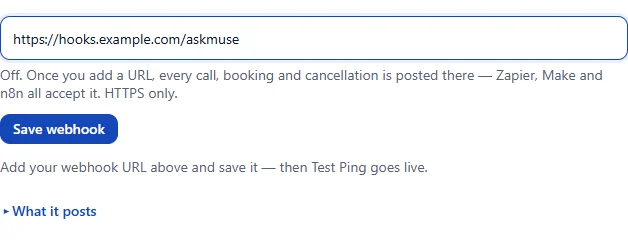
 The row then shows your signing secret, for the signature check.
Send a real sample
Make the workflow live, then call your AskMuse number from your own phone, give your name and what you need, and hang up. A
call.endedrun appears in the workflow's executions.Branch on the event
Add an If or Switch node on
Turn the webhook off any time from the same row in AskMuse.{{ $json.body.event }}, one branch per event you care about.
On Starter and up, and the 7-day free trial includes it. Use the trial to hear Muse answer your own calls with n8n connected, then keep it on any plan from Starter.
Compare the plansn8n + AskMuse FAQ
Is there an AskMuse node in n8n?
No. Use n8n's Webhook node: AskMuse posts JSON to its URL for every call, booking and new lead.
Which events can my workflow use?
call.ended, booking.created, booking.moved, booking.cancelled, lead.created and lead.escalated. The webhook page lists every field.
Is it part of the free trial?
Yes. The outgoing webhook is on the Starter plan and up, and the 7-day free trial includes it.
Hear Muse before you connect anything
Talk to Muse in your browser or call the line. Setup takes about 3 minutes.
n8n is a trademark of its owner. AskMuse, a Muse Nexus product, isn't affiliated with or endorsed by n8n; it posts to the Webhook node URL you give it.